What’s the Best Way to Scan Old Photos for a Personal Digital Archive?
If you’re digitizing old family photos, the real question usually isn’t “What looks good on my screen right now?” It’s:
“What’s the best way to capture these photos so I won’t have to redo this later?”
Speed and convenience matter—but if you’re building a personal digital archive, the most important thing is preserving as much of the original photo as possible. Once detail is lost, it’s gone for good.
To get beyond opinions and marketing claims, I compared several common photo-scanning methods using objective image-quality measurements rather than just visual impressions.
What I Set Out to Learn
The goal was simple:
- Which scanning methods preserve the most real detail?
- How much noise or artificial processing gets added?
- How do the options most people actually consider compare side by side?
This isn’t about what’s fastest or easiest. It’s about long-term quality.
The Photo Used for Testing
The test image is a roughly 50-year-old family photo. It’s faded and was likely taken with a typical point-and-shoot camera of the time.
That choice was intentional.
Most personal photo collections look like this:
- consumer prints
- modest sharpness
- faded colors
- limited contrast
Testing with a pristine modern print would be unrealistic. If a scanning method handles this kind of photo well, it will handle easier ones just fine.
Scanning Methods Compared
The same physical photo was digitized using:
Camera scan Nikon D5100 (16 MP) with a true macro lens, copy stand, and controlled lighting.
Feed scanner (best-case setting) Epson FastFoto at 600 dpi.
Consumer flatbed scanner Canon CanoScan LiDE 400 at 600 dpi.
Smartphone capture iPhone 16 Pro using macro mode.
Feed scanner (baseline only) Epson FastFoto at 300 dpi (included as a low-end reference).
A higher-end flatbed scanner (Epson V800/V850 class) will be added in a future update. Results are pending.
How the Comparison Was Done
To keep things fair:
- All images were converted to the same color space (sRGB)
- Images were resized to a common resolution
- No extra sharpening or noise reduction was applied
- All measurements were generated using the same analysis pipeline
Instead of judging by eye alone, I used objective image-quality metrics that look at:
- sharpness
- noise
- tonal variation
- statistical image “naturalness”
These were combined into a single composite score that favors preserving real information over making the image look smooth or polished.
Results (So Far)
| Method | Composite Score |
|---|---|
| Camera scan (Nikon D5100) | 85.8 |
| Feed scanner (FastFoto 600 dpi) | 62.1 |
| Consumer flatbed (CanoScan 600 dpi) | 38.2 |
| Smartphone (iPhone 16 Pro) | 14.0 |
| Feed scanner (FastFoto 300 dpi) | 6.0 |
Higher scores mean more usable detail with acceptable noise.
What Stood Out
Camera scanning captured the most detail
Even with an older, modest DSLR, the camera scan clearly preserved more fine detail than any scanner or phone.
That advantage comes from the method, not fancy gear:
- real macro optics
- even lighting
- short optical path
- minimal forced processing
Higher DPI helps feed scanners—but only so much
FastFoto at 600 dpi was noticeably better than 300 dpi, but still far behind the camera scan.
This is a good reminder that:
Scanner DPI numbers don’t equal real detail.
Feed scanners are designed for speed, not maximum quality.
Consumer flatbeds are clean but limited
The flatbed scan was consistent and relatively noise-free, but it didn’t capture fine detail as well as the higher-DPI feed scan.
A higher-end flatbed may do better, which is why that test is next.
Smartphones are convenient, not archival
The iPhone scan ranked near the bottom. That doesn’t mean it’s a bad camera—it’s doing exactly what it’s designed to do.
Phones prioritize:
- pleasing results
- noise reduction
- contrast enhancement
Those choices make photos look good on screens, but they discard subtle information that matters for archiving.
“Looking good” isn’t the same as “preserving detail”
Some smoother scans scored better on perceptual metrics, but that didn’t mean they preserved more information.
For archiving, detail beats polish.
What About Professional Scanning Services?
Most photo-scanning labs use:
- industrial feed scanners
- high-end flatbeds
- or older camera rigs optimized for volume
Good labs often do better than entry-level consumer scanners, but they usually fall in the middle of the range shown here. Only specialized reprographic or museum-grade services—using high-resolution camera rigs—consistently exceed what a careful home camera-scan setup can achieve.
Why the 300 dpi Feed Scan Isn’t Shown in Detail
FastFoto at 300 dpi was included to establish a baseline. As expected, it ranked last and didn’t add much to the comparison, so it’s not shown in detailed image crops.
The Takeaway
If you’re building a long-term personal digital archive:
- Camera scanning offers the highest quality and the most room to grow.
- Feed scanners are great for speed, but trade away detail.
- Consumer flatbeds are predictable but optically limited.
- Smartphones are best for convenience, not preservation.
The biggest lesson isn’t about brands or megapixels. It’s this:
The scanning method matters more than the device.
If you want to avoid rescanning your photos years from now, capturing as much real information as possible up front is the safest bet.
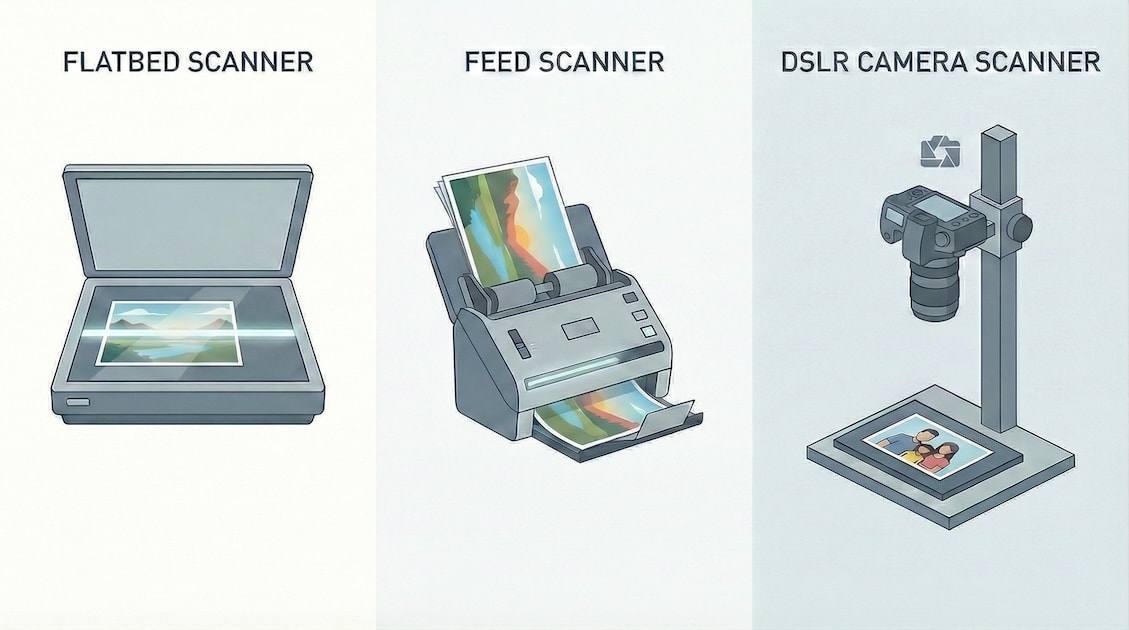
DSLR Camera Scanner
DSLR camera scanning is a method of digitizing photographs or film by mounting a digital camera above the original and photographing it under controlled lighting, rather than passing it through a traditional flatbed or feed scanner. When done carefully—using a stable copy stand, even illumination, a sharp lens, and proper alignment—it can capture very high resolution, excellent sharpness, and strong tonal range while minimizing handling of fragile originals. The quality depends heavily on technique and setup, but a well-executed DSLR scan can rival or exceed consumer scanners, especially for prints and larger formats, while offering speed and flexibility that make it attractive for serious personal archiving.
Feed Scanner
A feed scanner is a document or photo scanner that pulls originals through the device using rollers, scanning them line by line as they move past a fixed sensor. This design makes feed scanners fast and convenient for batch scanning, but it can introduce limitations for photographs, such as lower optical resolution, uneven sharpness, and a higher risk of bending or damaging fragile prints. They are best suited for loose documents and casual photo digitization rather than high-fidelity archival work.
Flatbed Scanner
Flatbed scanning is a method of digitizing documents or photographs by placing the original face-down on a glass platen while a sensor moves beneath it to capture the image line by line. It offers consistent alignment, even illumination, and gentle handling, making it suitable for fragile prints and materials that cannot be fed through rollers. While high-quality flatbeds can produce excellent results, especially at moderate resolutions, they are typically slower than feed scanners and may fall short of well-executed DSLR camera scanning in sharpness and detail for demanding archival work.
Smartphone Scanner
Smartphone scanning uses a phone’s built-in camera, often paired with a scanning app, to photograph documents or photos and automatically correct perspective, crop edges, and adjust contrast or color. It is fast and convenient and can produce surprisingly good results for casual use, but image quality is limited by small sensors, fixed lenses, and aggressive software processing. Smartphone scanning is best viewed as a convenience option rather than an archival one, suitable for quick sharing and reference but not for preserving maximum detail or tonal fidelity.
Detailed Results
| Scan | Tech | Overall Score | BRISQUE | LAP VAR | Tenengrad | Noise Est. | Entropy |
|---|---|---|---|---|---|---|---|
| Nikon 5100 w/ Macro Lens | DSLR Camera Scanner | 85.8 | 36.16 | 33.24 | 1357 | 1.087 | 6.59 |
| Epson FastFoto (600 DPI) | High-speed Feed Scanner | 62.12 | 35.13 | 21.21 | 958 | 1.125 | 6.44 |
| CanoScan LiDE 400 (600 DPI) | Flatbed (entry-level) | 38.21 | 39.61 | 22.8 | 1230 | 0.984 | 6.61 |
| IPhone 16 Pro | Phone Camera | 13.98 | 39.7 | 18.88 | 1129 | 1.216 | 6.44 |
| Epson FastFoto (300 DPI) | High-speed Feed Scanner | 6.05 | 40.66 | 19.0 | 984 | 1.123 | 6.45 |
- Composite score
- A single overall score that combines several image-quality measurements to rank scans against each other.
- How to interpret it: Higher is better, but only meaningful when comparing scans in the same test set.
- BRISQUE (40%) + LAP VAR (20%) + NIQE (20%) Tenegrad (10%) + Noise Est (10%)
- How to interpret it: Higher is better, but only meaningful when comparing scans in the same test set.
- BRISQUE
- An automated estimate of how “natural” an image looks, based on common visual cues humans notice.
- How to interpret it: Lower is better; high values suggest blur, noise, or other visible artifacts.
- NIQE
- A statistical measure of how much an image differs from what a typical natural photo looks like.
- How to interpret it: Lower is better, but it can be unreliable or unavailable for some images.
- Laplacian variance
- A measure of how crisp edges are, used as a proxy for overall sharpness.
- How to interpret it: Higher values mean sharper images; low values indicate blur.
- Tenengrad
- A sharpness score that focuses on strong edges and fine detail.
- How to interpret it: Higher is better and usually aligns well with what people perceive as “in focus.”
- Noise standard deviation
- An estimate of random grain or speckling in the image.
- How to interpret it: Lower is better; higher values mean more visible noise.
- Entropy
- A measure of how much tonal and detail information the image contains.
- How to interpret it: Higher often means richer detail, but unusually high values can also indicate noise.